How to Read Manga from Baidu Netdisk Directly on iPad/iPhone? No-Download Streaming Solution (2026)

How to Read Manga from Baidu Netdisk Directly on iPad/iPhone? No-Download Streaming Solution
On iOS, using a manga reader that supports Baidu Netdisk mounting (like the "Manga Capsule" I developed), you can log in and authorize your Baidu account within the app. ZIP/EPUB/CBZ manga from the netdisk will appear directly on your bookshelf—you can start reading right away without taking up phone storage or having to download multi-gigabyte archives to your local device first.
Many people's manga storage path looks like this: resources collected from the internet first stop at Baidu Netdisk. But when it's time to read, things get complicated—the Baidu Netdisk app itself can't open EPUB files, and browsing through archives in image mode is a nightmare; downloading first then importing to a reader can mean dozens of gigabytes for a full series, which iPad storage simply can't handle, and non-member download speeds are painfully slow.
Streaming Solution: Three Steps
- Download Manga Capsule (Search "Manga Capsule" on App Store, free download)
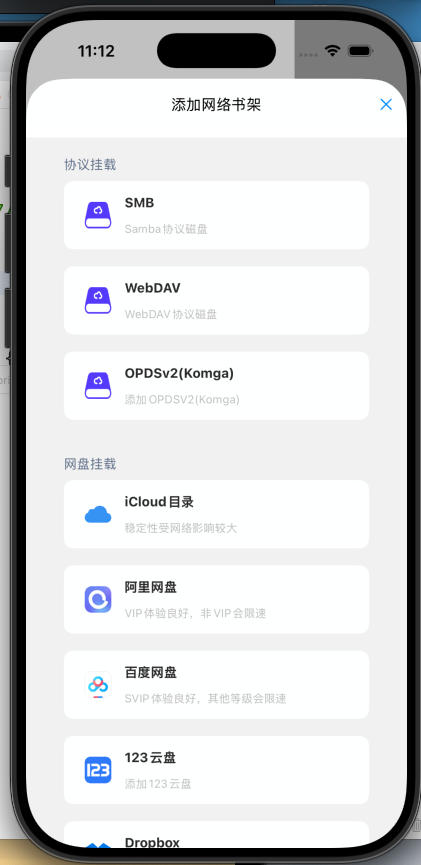
- Add Baidu Netdisk: On the bookshelf page sidebar, add a network bookshelf → select "Baidu Netdisk" → jump to Baidu's official page to log in and authorize
- Navigate to your netdisk directory, find the manga folder, files are displayed directly as covers—just tap to read
Compatible ZIP/CBZ archives can load page data on demand. Opening time varies with the provider, file and network. RAR/CBR and some PDF sources download before reading, and caches use local storage.
Supported Formats
Supported formats include ZIP/CBZ, RAR/CBR, PDF, comic EPUB, MOBI and AZW3. RAR/CBR requires download and extraction; some PDF sources require downloading too. 7z is not in the current supported import list.
Streaming reading has the best support for EPUB format and ZIP archives—those two formats are highly recommended.
Streaming vs. Downloading
| Comparison | Netdisk Streaming | Download First |
|---|---|---|
| Local storage used | Almost none | File size = space used |
| Open speed | On-demand loading when supported | Wait for full download |
| Non-member speed limit impact | Minimal (on-demand loading) | Full download is painful |
| Offline reading | Requires pre-caching | ✅ |
Need to board a plane or go somewhere without internet? Long-press a book to cache it locally in advance—switch between modes anytime.
FAQ
Q: Do I need a Baidu Netdisk membership? A: Not required. But streaming reading loads on demand, so you need a relatively fast network speed—you know how free Baidu Netdisk speeds are. For larger manga resources, a membership provides the best experience.
Q: Is it safe? Will my Baidu account be compromised? A: Authorization goes through Baidu's official OAuth login page. The app only receives an access token—it never gets your account password. Manga files are never uploaded to any third-party servers.
Q: What if the manga on Baidu Netdisk is split into multi-part archives (.part1.rar, etc.)? A: For split archives, it's recommended to merge and extract them on your computer first, then upload as a single ZIP for the best streaming experience.
Q: What other cloud services are supported besides Baidu Netdisk? A: Aliyun Drive, 123 Cloud, iCloud Drive, Dropbox and NAS SMB/WebDAV connections are available. Setup and loading behavior differ by source. Native Google Drive mounting is not currently offered; download supported files through the provider and import them instead.
📥 Download Manga Capsule from App Store
🔗 Related Reading:
Pro requirement: Network shelves and streaming require Pro. The app offers monthly, yearly and lifetime options at regional prices. Cloud-provider fees or speed limits are separate.