How to Fix Gaps and Severe Disjointed Feeling Between Webtoon Images? Seamless Webtoon Reading Solution (2026)
How to Fix Gaps and Severe Disjointed Feeling Between Webtoon Images?
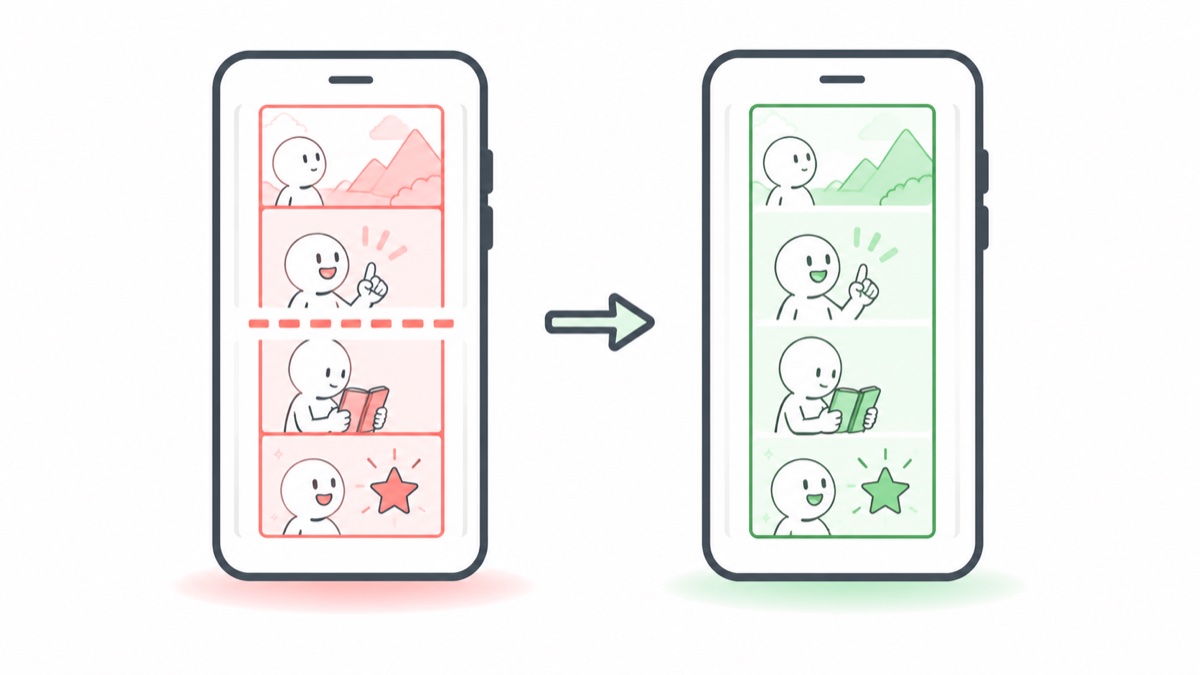
The gaps in webtoons aren't a resource issue—they're a rendering problem. Switch to a reader that supports "seamless stitching" and you can completely solve it.
Webtoon resources are originally long images sliced into many pieces. Regular readers treat each slice as an independent "page," which naturally creates gaps and disjointed feelings between slices. Webtoon-enabled readers reassemble the slices back into one continuous long image, eliminating the gaps entirely.
Why Do Gaps Appear?
Korean and Chinese webtoons originally come as long images tens of thousands of pixels high. For transmission and storage, they're sliced into hundreds of ~800×1280 pieces and packaged into PDFs. The problem occurs at the reading end:
- Page-by-page rendering: Regular readers treat each slice as a page, with spacing between pages → obvious white gaps
- Zoom rounding errors: Inconsistent height rounding during screen zoom → thin gray lines and misalignment
- PDF webtoons are worse: PDFs have built-in margins per page, creating the strongest disjointed feeling whenjoined
Summary: The resources aren't broken—the reader just isn't optimized.
Solution
Use a reader that auto-detects webtoons. Take my developed "Manga Capsule" as an example:
- Auto-detection: Open a comic, and once long-slice characteristics are detected, it automatically switches to webtoon mode (continuous vertical scrolling)—no manual settings needed
- Seamless stitching rendering: Slices arejoined into a continuous image at the rendering layer, calculated as a whole during zoom—no gaps or misaligned lines will appear
- PDF webtoon support: PDF-formatted webtoons are also automatically de-margined and stitched (we specifically fixed a batch of edge cases for this scenario in version 1.41)
- Streaming loading: Webtoon chapters are small in file size but large in quantity—pairing with NAS/WebDAV direct reading provides the smoothest experience
Additionally, the progress bar and quick jump in webtoon mode are also optimized by "chapter" unit, so following long Korean webtoons won't leave you lost.
FAQ
Q: Do I need to manually stitch webtoon resources into a long image first? A: No need. Just read the ZIP containing slices directly—stitching is done by the reader's rendering layer.
Q: Is webtoon suitable for small iPhone screens? A: Webtoons were originally designed as vertical mobile-first layouts. The vertical scrolling experience on iPhone is actually better than reading page comics. On iPad, you can appropriately reduce the image width for a more comfortable viewing distance.
Q: Will regular manga (page comics) be misidentified as webtoons? A: Identification is based on image aspect ratio features—page comics will normally enter page-turning mode. In the rare case of misidentification, you can manually switch in reading settings.
📥 Download Manga Capsule on App Store
🔗 Related Reading: